How to Make a Resume PDF Without Paying to Download It
A lot of resume sites let you spend an hour on your resume and then ask you to pay to download it. Resume Builder gives you the PDF, with no watermark.
Step by step
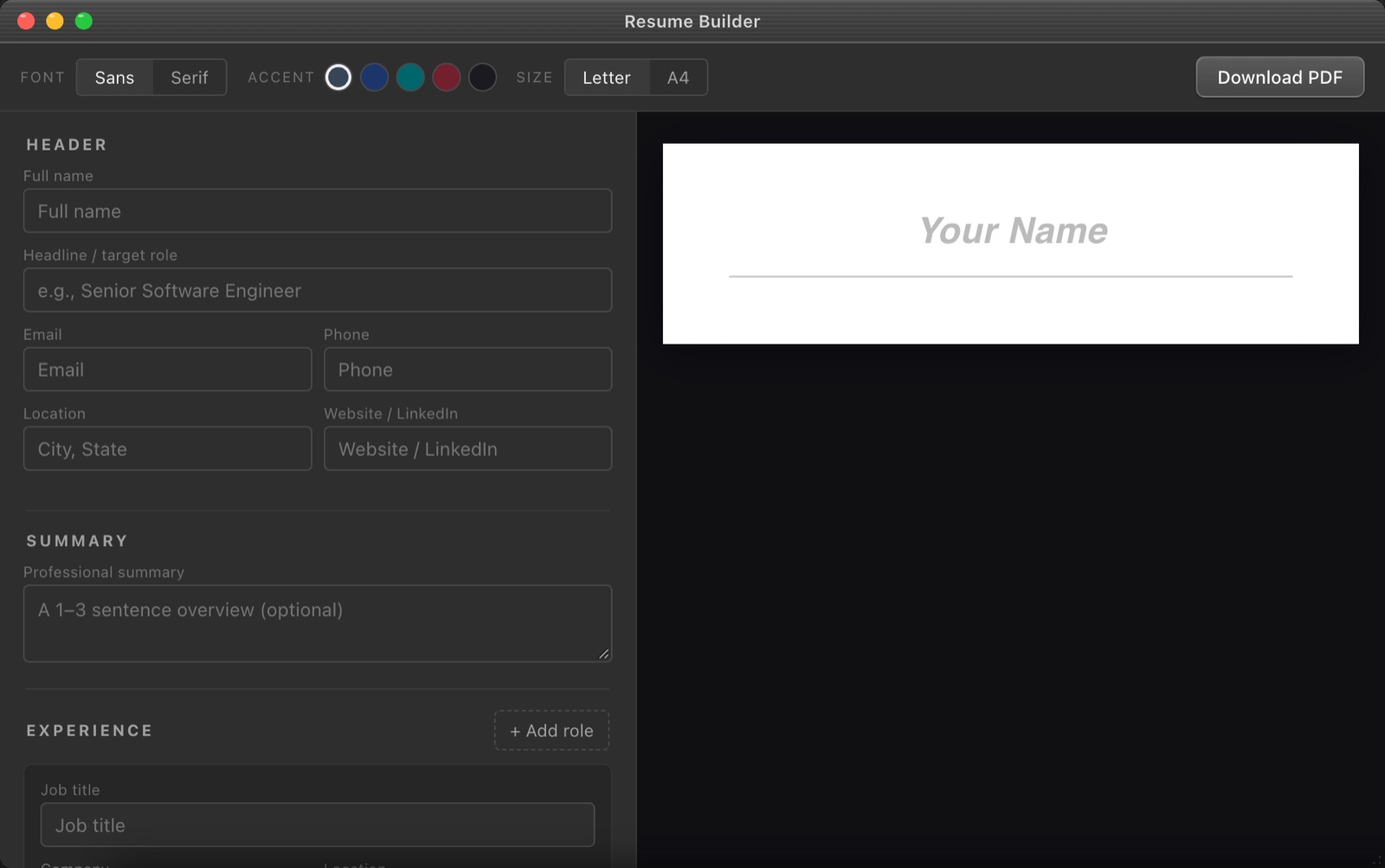
Open Resume Builder in DiverseConnect. The form is on one side and a live preview of the page is on the other.
Fill in Header with your name and contact details, then write a short Summary.
Under Experience, click + Add role for each job and + Add bullet for each thing you did there. Add schools with + Add education, then list your Skills.
Pick the look: Sans or Serif type, an accent color, and Letter or A4 paper.
Click Download PDF. Your resume goes to your Downloads folder as a real PDF, ready to send.
Questions
Is there a watermark?
No. The PDF has nothing added to it.
Do I need an account?
No. There’s nothing to sign up for, and your resume stays on this computer.
Letter or A4?
Letter is the usual size in the US and Canada; A4 is the usual size almost everywhere else.
Does Resume Builder need the internet?
No. Resume Builder is part of DiverseConnect, which works with the internet switched off, so it keeps working on a plane, in a dead zone, or when the Wi-Fi is down.